URL Shortener
Transform your long URLs into powerful, trackable short links with advanced targeting options. Stackly offers two modes: Single Link for individual URLs with custom slugs, and Multi Link for bulk shortening multiple URLs at once.
Single Link Mode
Create individual shortened URLs with full customization options including custom slugs, tags, and advanced targeting.
Create Short URL Interface
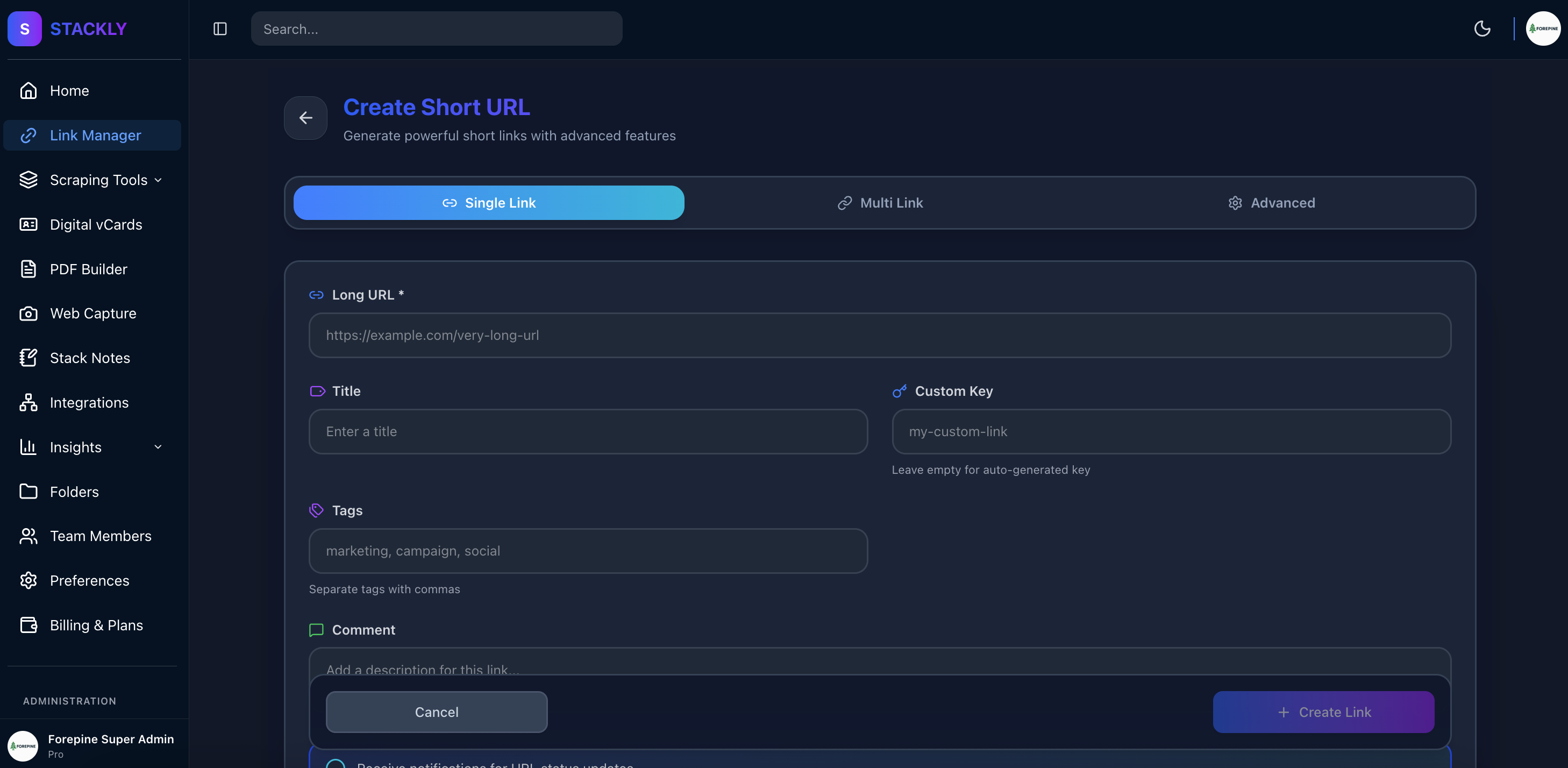
The URL shortener interface provides a clean and intuitive way to create shortened links with basic and advanced options.
How to Create a Single Shortened URL
1. 🔗 Bring Your Long URL
Required
Start by providing the long URL you want to shorten. This is the destination where users will be redirected.
Example:
https://example.com/your-very-long-url-path/with/many/segments
2. 🏷️ Add Title
Required
Give your shortened link a memorable title or leave it blank to auto-generate a title based on the URL to help you identify it later in your dashboard.
Example:
Q4 Marketing Campaign - Product Launch
3. 🔗 Add Custom Slug
Optional
Optionally customize the short URL path. If not provided, a random slug will be generated.
Example:
my-custom-link → stackly.in/my-custom-link
4. 🏷️ Add Tags
Optional
Organize your links with tags for easy filtering and categorization in your dashboard.
Example:
marketing, campaign, social-media
5. 💬 Add Comment
Optional
Add internal notes or comments about this link for your team or future reference.
Example:
This link is for the Q4 product launch campaign targeting North America
6. 📅 Set Custom Expiration Date
Optional
Set a date and time when the link should expire. After expiration, the link will no longer redirect.
Example:
2025-12-31 23:59:59
Advanced Targeting Options
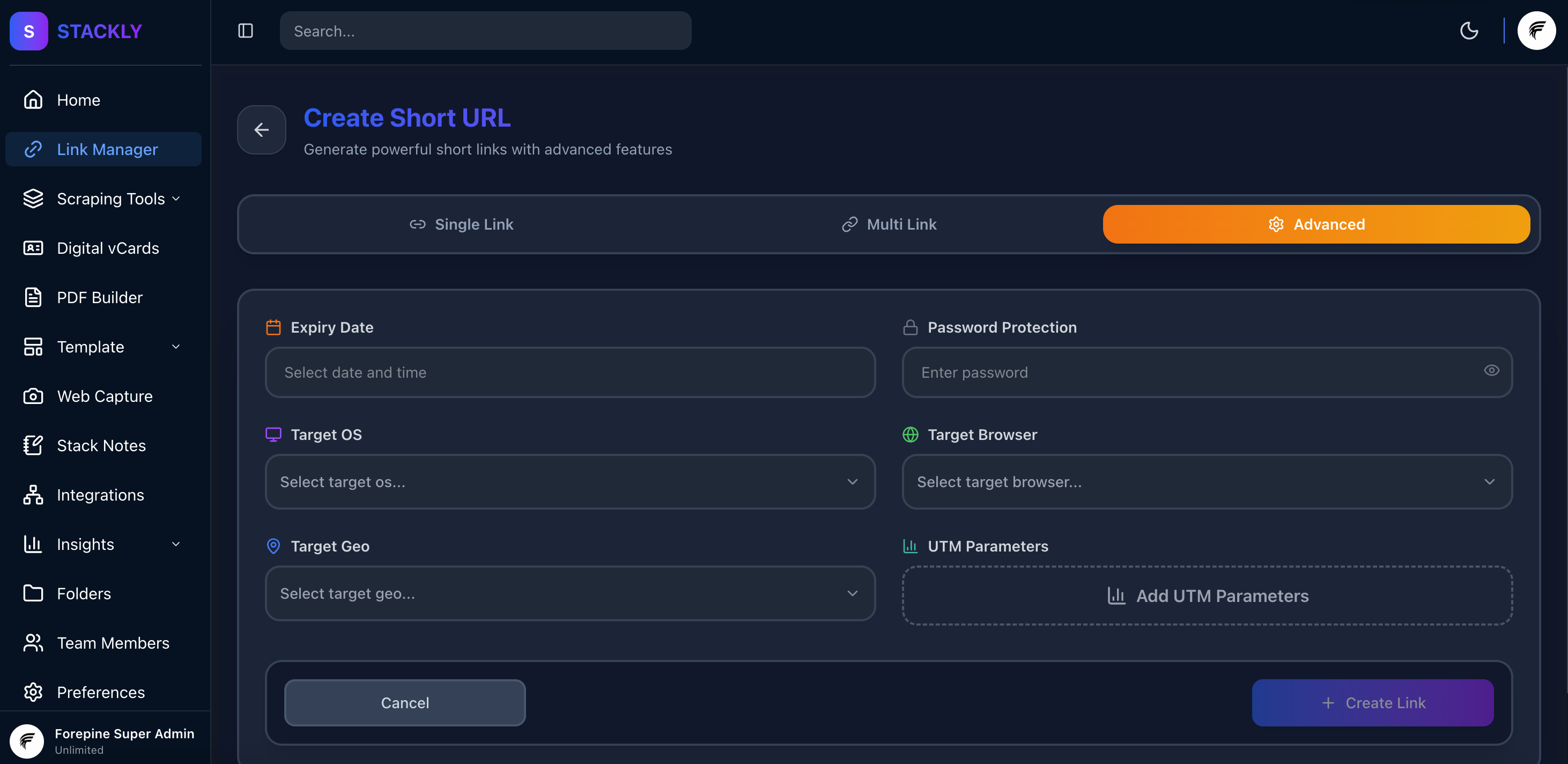
The Advanced tab provides powerful targeting capabilities to customize your link behavior based on user attributes.
7. 💻 Set Target Operating Systems
Optional
Target specific operating systems. Users on other OS will see a different page or be redirected elsewhere.
Example:
Windows, macOS, Linux, iOS, Android
8. 🌐 Set Target Browsers
Optional
Target specific browsers for your link. Useful for browser-specific campaigns or features.
Example:
Chrome, Firefox, Safari, Edge, Opera, Brave
9. 📍 Set Target Geolocation
Optional
Target users from specific geographic regions. Perfect for location-based campaigns.
10. 🔗 Set UTM Parameters
Optional
Add UTM parameters to your shortened link to track and analyze your campaigns.
Example:
North America, Europe, Asia, South America, Africa, Oceania
10. 🔔 Enable Real-time Notifications
Optional
Get instant notifications on your webpage when someone clicks your shortened link.
Example:
Enable to receive real-time alerts for link clicks
Multi Link Mode
Bulk shorten multiple URLs at once with automatic slug generation. Perfect for creating many short links quickly without manual customization.
Create Multiple Short URLs Interface
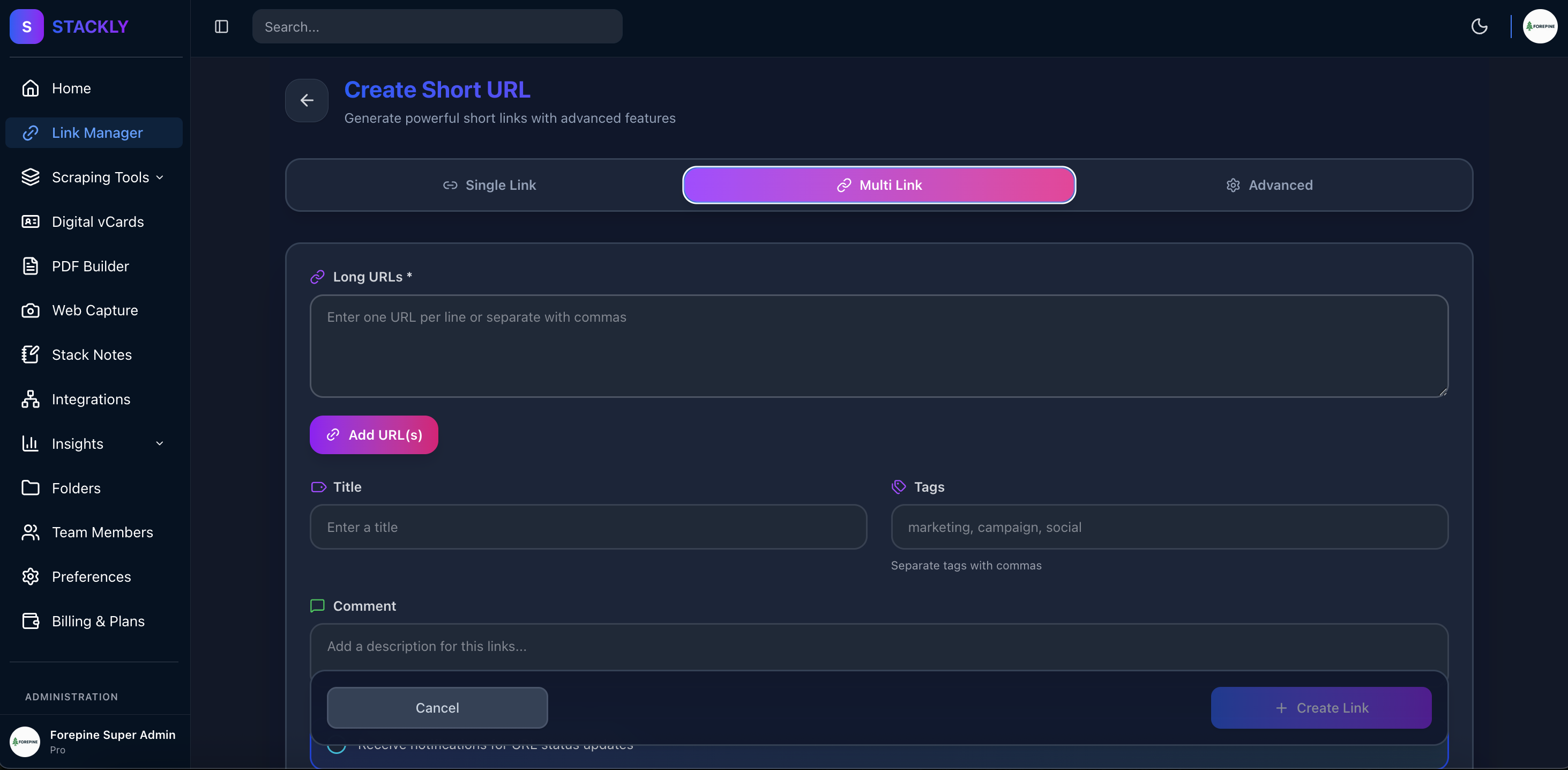
The Multi Link mode allows you to paste multiple URLs and generate shortened links in bulk with automatic slug generation.
How to Create Multiple Shortened URLs
1. 📋 Paste Multiple URLs
Required
Enter multiple long URLs, one per line. Each URL will be shortened with an automatically generated slug.
Example:
https://example.com/product/item-1
https://example.com/product/item-2
https://example.com/blog/article-1
https://example.com/landing/campaign-page
2. 🏷️ Add Title for Each Link
Required
Provide a title for each URL to help identify them in your dashboard. Titles should be entered one per line, matching the order of your URLs.
Example:
Product Item 1
Product Item 2
Blog Article 1
Campaign Landing Page
3. 🏷️ Add Tags (Bulk)
Optional
Add common tags that will be applied to all shortened links in this batch. Great for organizing related links together.
Example:
marketing, q4-campaign, products
4. 💬 Add Comment (Bulk)
Optional
Add a common comment or note that applies to all links in this batch.
Example:
Q4 2025 Product Launch - Social Media Campaign Links
Key Differences from Single Link Mode
| Feature | Single Link | Multi Link |
|---|---|---|
| Custom Slug | ✅ Available | ❌ Auto-generated |
| Bulk Creation | ❌ One at a time | ✅ Multiple at once |
| Individual Titles | ✅ One title | ✅ Multiple titles (one per URL) |
| Common Tags | ✅ Per link | ✅ Applied to all |
| Advanced Targeting | ✅ Full control | ✅ Full control |
| Expiration Date | ✅ Per link | ✅ Applied to all |
Benefits of Multi Link Mode
- ⚡ Fast Bulk Creation - Shorten dozens of URLs in seconds
- 🎲 Automatic Slugs - No need to think of custom slugs for each link
- 🏷️ Batch Organization - Apply common tags to all links at once
- 📊 Consistent Tracking - Group related links for easier analytics
- ⏱️ Time Saving - Perfect for large campaigns or content migrations
Key Features
🌍 Geo-Targeting
Target specific regions and deliver personalized content based on user location for maximum engagement.
💻 Device Targeting
Customize link behavior based on operating systems and browsers for optimized user experience.
🔔 Real-time Alerts
Get instant notifications when your links are clicked and track engagement in real-time.
💎 Branded Domains (Premium)
Use your own domain for short links (e.g., link.yourbrand.com/xyz) to build trust and brand recognition.
Format: <key>.yourdomain.com
Why Use Stackly URL Shortener?
✅ Advanced Analytics
Track clicks, geographic data, device types, and more with comprehensive analytics.
✅ Custom Branding
Use custom slugs and domains to maintain your brand identity across all links.
✅ Link Management
Organize links with tags, set expiration dates, and manage everything from one dashboard.
✅ API Integration
Integrate URL shortening into your applications with our powerful REST API.
Getting Started
Ready to start creating powerful shortened URLs with advanced targeting and analytics?
- Start Shortening URLs - Begin creating your first shortened URL
- Check back soon for API documentation and more guides!